Many people see image files ending in .jpg and .jpeg and wonder if they are different. Some think one gives better quality, while others believe one is newer or more professional.
The good news is that the confusion is easy to clear up.
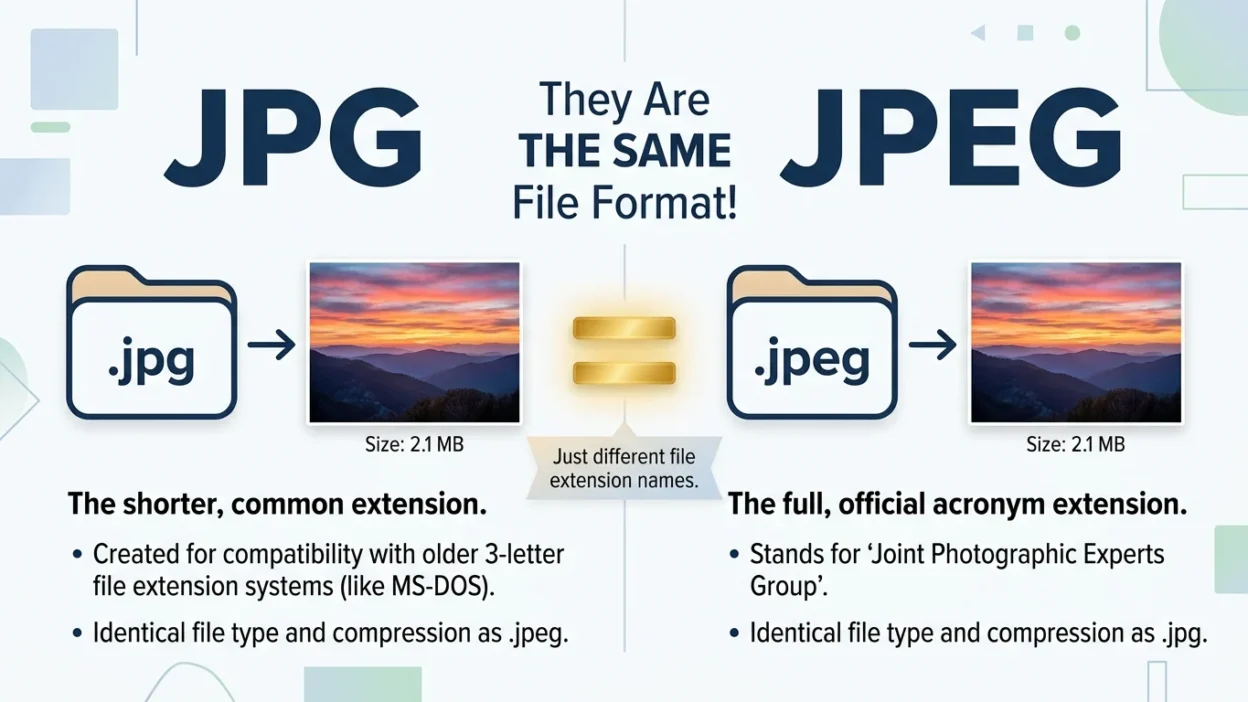
In reality, JPG and JPEG are the same image format. The different names come from older computer system limits, not from differences in image quality or features.
This guide explains everything in very simple English so students, beginners, and everyday computer users can understand the difference right away.
Quick Answer
Here is the short answer:
- JPG and JPEG are the same file format.
- Both use the same image compression method.
- Both produce the same image quality.
- Both can be opened by the same programs.
- The only real difference is the file extension:
- .jpg
- .jpeg
- You can usually rename a JPG file to JPEG (or vice versa) without changing the image.
Simple rule: If you see JPG or JPEG, think of them as the same thing.
Where Did JPG and JPEG Come From?
To understand the two names, it helps to know a little history.
The image format was originally created by the Joint Photographic Experts Group, a team that developed a way to store photos using less space.
Because of that group, the format became known as JPEG.
The official file extension was:
.jpeg
However, many older computer systems only allowed file extensions with three letters.
Since “jpeg” has four letters, people shortened it to:
.jpg
As a result:
- Some computers used .jpeg
- Some computers used .jpg
Over time, both became accepted everywhere.
Today, modern computers support both extensions without any problems.
The Real Difference Between JPG and JPEG
The most important thing to know is this:
There is no difference in the image itself.
A JPG file and a JPEG file use the same technology.
They store pictures in exactly the same way.
What is the same?
- Image quality
- Compression method
- Colors
- File size
- Compatibility
- Editing options
What is different?
Only the letters at the end of the file name.
Example:
- vacation.jpg
- vacation.jpeg
Both files can contain the exact same image.
If the image data is identical, they will look exactly the same.
JPG vs JPEG Comparison Table
| Feature | JPG | JPEG |
| File format | JPEG format | JPEG format |
| Image quality | Same | Same |
| Compression | Same | Same |
| File size | Same | Same |
| Photo storage | Yes | Yes |
| Supported by modern devices | Yes | Yes |
| Supported by image editors | Yes | Yes |
| Better than the other? | No | No |
| Original full extension | No | Yes |
| Common today | Very common | Common |
Bottom line: There is no quality or performance advantage between them.
Understanding JPEG Compression
To fully understand JPG and JPEG, it helps to know how the format works.
JPEG images use something called compression.
Compression reduces file size so images take up less storage space.
For example:
- A large photo may be 20 MB before compression.
- After JPEG compression, it may become 3 MB.
This makes photos easier to:
- Store
- Upload
- Share online
The trade-off is that some image information is removed.
Most of the time, people cannot easily notice the difference, especially in normal photographs.
This compression system is used by both JPG and JPEG files.
Why Are JPG and JPEG So Popular?
JPEG has been one of the most widely used image formats for many years.
People use it because:
Small File Sizes
Photos take up less space on phones and computers.
Fast Sharing
Smaller files upload faster.
Good Photo Quality
Images usually look clear even after compression.
Universal Support
Almost every device can open JPG and JPEG files.
Easy Storage
You can store thousands of photos without using too much space.
Because of these advantages, JPG and JPEG remain common choices in 2026.
Which One Should You Use?
For most people, the answer is simple:
Use whichever extension your device or software creates automatically.
There is usually no reason to choose one over the other.
Use JPG when:
- Your camera saves files as JPG.
- Your phone creates JPG files.
- Your editing software exports JPG files.
Use JPEG when:
- Your software saves images as JPEG.
- A website asks for JPEG files.
- You prefer the longer extension.
Both options work the same way.
Important Tip
If a website accepts JPG files, it almost always accepts JPEG files too.
Likewise, if it accepts JPEG files, JPG files are usually accepted.
Common Mistakes People Make
Mistake 1: Thinking JPEG Has Better Quality
Many beginners assume JPEG gives higher quality because the name is longer.
This is false.
JPG and JPEG use the same image format.
Mistake 2: Believing JPG Is Older Technology
Some people think JPG is outdated.
Actually, JPG and JPEG are the same technology.
The names simply come from different file extension styles.
Mistake 3: Renaming Creates Better Images
Changing:
photo.jpg
to
photo.jpeg
does not improve image quality.
Only the file name changes.
Mistake 4: Thinking Programs Treat Them Differently
Most image viewers, editors, and web browsers treat JPG and JPEG exactly the same way.
Mistake 5: Assuming One Uses More Storage
A JPG and JPEG version of the same image usually have identical file sizes.
Everyday Real-Life Examples
Sending Photos by Email
You take vacation photos and send them to friends.
The files may be:
- beach.jpg
- family.jpeg
Both can be attached and sent normally.
Posting on Social Media
You upload a picture from your phone.
The image may be stored as JPG or JPEG.
The platform handles both formats.
Reading Online News
News websites use many photographs.
Most are saved in JPEG format, even if the file extension appears as JPG.
School Assignments
A teacher asks students to submit image files.
Usually either JPG or JPEG is acceptable.
Storing Family Photos
A photo collection may contain both extensions.
The images still work the same way.
Learning Section for Students and Beginners
Here is an easy way to remember the difference.
Think of Them as Nicknames
Imagine a person named:
Jonathan
Some people call him:
Jon
Both names refer to the same person.
Similarly:
- JPEG = full version
- JPG = shortened version
The image format stays the same.
Memory Trick
Remember this sentence:
“JPG and JPEG are twins with different name tags.”
If you remember that sentence, you will never be confused again.
Simple Practice
Look at these file names:
- cat.jpg
- dog.jpeg
- school.jpg
- holiday.jpeg
Question:
Which files use the JPEG image format?
Answer:
All of them.
Frequently Asked Questions (FAQ)
1. Is JPG the same as JPEG?
Yes.
They are the same image format and use the same technology.
2. Which has better quality, JPG or JPEG?
Neither.
Image quality is the same.
3. Why are there two names?
Older computer systems often used three-letter extensions, which led to the shortened “.jpg” version.
4. Can I change JPG to JPEG?
Yes.
In most cases, changing the extension does not change the image itself.
5. Do phones use JPG or JPEG?
Many phones save images as JPG, but some software may display them as JPEG.
Both are normal.
6. Are JPG and JPEG different file sizes?
No.
The same image will generally have the same size whether the extension is JPG or JPEG.
7. Can image editing programs open both?
Yes.
Most image editors support both extensions.
8. Which format should students use for assignments?
Either JPG or JPEG is usually fine unless specific instructions say otherwise.
Conclusion
The confusion between JPG and JPEG is very common, but the answer is surprisingly simple.
JPG and JPEG are the same image format.
They use the same compression method, offer the same image quality, work with the same software, and take up the same amount of storage space. The only real difference is the file extension at the end of the file name.
If you see .jpg, think JPEG.
If you see .jpeg, think JPG.
For everyday tasks such as emailing photos, sharing images on social media, completing school projects, or storing pictures on your device, both formats work exactly the same way. Once you understand this simple fact, the JPG vs JPEG question becomes one of the easiest technology topics to remember in 2026.

Gregory Alexander is a skilled writer and language researcher at WordHuts.com. He focuses on clarifying confusing word pairs, grammar rules, and common usage mistakes. With a passion for precise communication, Gregory creates simple, easy-to-understand content that helps readers strengthen vocabulary, writing accuracy, and everyday English skills.